What you own comes first
Point it at your music folders, or let it read your DJ software: Rekordbox, Serato, Traktor, Engine DJ, VirtualDJ, Lexicon or Apple Music. Tracks you already have cost nothing, so they’re never on the shopping list.
For DJs who find music on streaming apps
Your playlist lives on Spotify or Apple Music. Your gig doesn't. Own the Set turns your playlist into tracks you can DJ with, without an evening of searching store by store. It starts with the music you already own, then finds the cheapest way to buy the rest in DJ quality.
Free during the beta · Mac first, Windows and Linux to follow
Why it exists
When you start DJing, you use the tools you already know. For most new DJs, my son among them, that means Spotify: it’s where you find tracks, build playlists and plan your first sets. Then you want to play one at a party or a gig.
Spotify’s own terms rule out “playing mixes in clubs, venues, events, or livestreams”. So every track on the playlist has to be bought: the right mix, in a format a DJ can use, from whichever store has it. Doing that by hand takes an evening of browser tabs, and usually a few radio edits bought by mistake.
Own the Set does that evening’s work in minutes: it checks every track against your library and the stores, and hands you one list to buy from.
How it works
Select the tracks in Spotify and drag them in. Or drop an Apple Music playlist export, a CSV from TuneMyMusic, or Exportify's zip of all your Spotify playlists, or paste a track list.
Your music folders, your DJ software and the tracks you've marked as in your record pool are checked first. Owned tracks cost nothing.
The right mix, in WAV, AIFF, FLAC or MP3 320, at the cheapest store, without searching each one yourself. Whole EPs when they cost less, and second-hand CDs for tracks no store sells as a download. Then you buy on each store's own page, ticking tracks off as you go.
Step by step: your first plan, in the docs.
The plan
Every track gets the cheapest way in: your library, your record pool, a free download, a whole EP, then the best single price. Second-hand CDs fill in for tracks no store sells as a download. A track in three playlists is on your list once. Own the Set does the searching, so you don't open a tab for every track.
Includes 1 second-hand CD: its postage is extra. £12.03 less than buying every track one by one.
See it
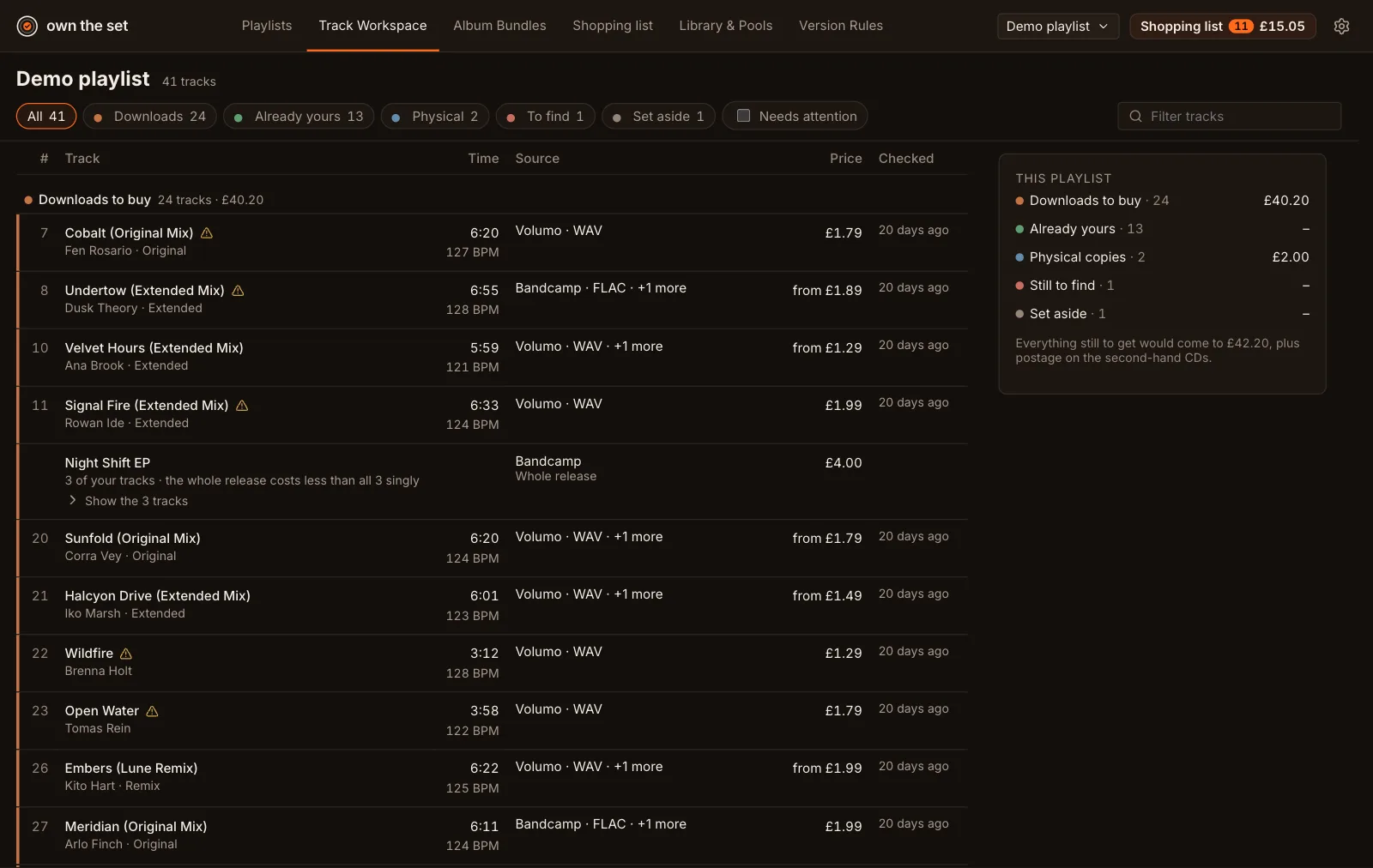
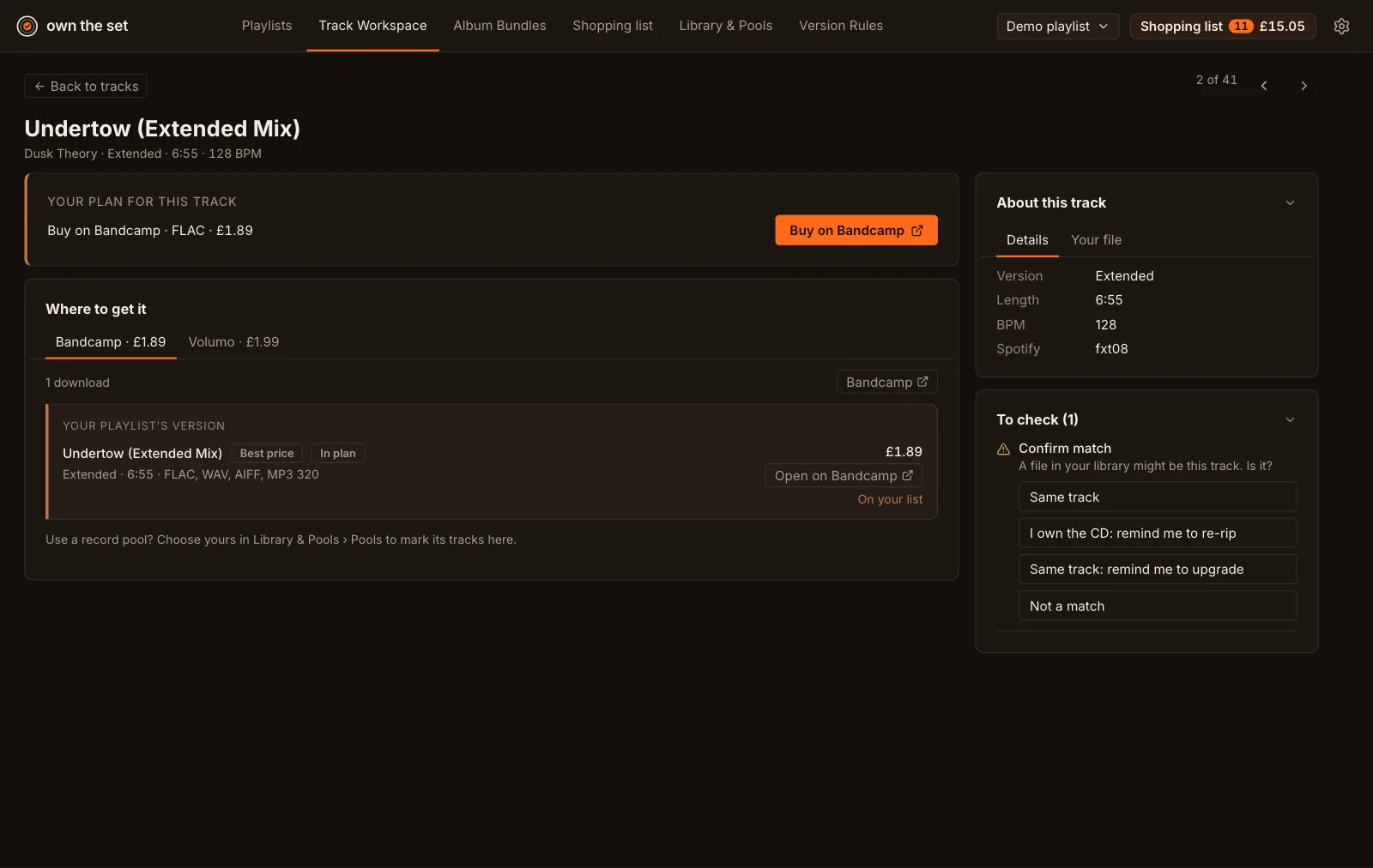
Screenshots of the built-in demo playlist. See every feature.
Features
Point it at your music folders, or let it read your DJ software: Rekordbox, Serato, Traktor, Engine DJ, VirtualDJ, Lexicon or Apple Music. Tracks you already have cost nothing, so they’re never on the shopping list.
Upload Exportify’s Export All zip and every playlist waits in the app, sorted by when you last added to it, until you choose which to import. Long playlists keep their newest 50 tracks, repeated tracks are removed, and a newer export updates the playlists you’ve already imported.
Pick tracks from any of your playlists or uploads into a new one. From any track, add it to another playlist, or see which of your playlists already have it.
Spotify often has the radio edit. Your set needs the Extended or Original Mix. Own the Set looks for the club version and never swaps in an edit without asking.
No tab per track: each track has its own page listing the versions each store sells, with formats and prices side by side. Tick the tracks you’re ready to buy and check just those prices, one at a time.
WAV, AIFF, FLAC or MP3 320, and MP3 256 or iTunes’ 256 kbps AAC when no WAV, AIFF, FLAC or MP3 320 download is on offer (you can switch that off). Anything lower is flagged for an upgrade, and the plan never points you to it.
A label’s own Bandcamp page, a free or name-your-price download, a whole EP that costs less than its tracks, or a second-hand CD for a track no store sells as a download (postage extra). Own the Set checks these for you, so you don’t need to know where to look.
Mark what’s in your record pool (DJCity, BPM Supreme, ZipDJ or Digital DJ Pool) and, if you subscribe, those tracks cost nothing. Not a member? It tells you whether a month’s subscription would pay for itself.
It runs on your computer. No account, no Spotify login, no tracking. Your library never leaves your desk.
Checks Bandcamp, Volumo, iTunes and Discogs today. More DJ stores are on the way. Every feature, screen by screen.
Questions
No. It works out where to buy each track and links you to that track’s page on the store. You buy it there, at the store’s own price.
No. Select the tracks in the Spotify app, drag them onto Own the Set, and that’s it. You can also paste a list or drop in a CSV export.
No. Spotify is the quickest: drag the tracks straight in. From Apple Music, export the playlist (File > Library > Export Playlist) and drop the file in. From YouTube Music, TIDAL, Deezer, SoundCloud or Amazon Music, export the playlist as a CSV file with TuneMyMusic first. Exportify and Soundiiz CSV files work too, and so does Exportify’s Export All zip of every Spotify playlist: you choose which to import. Get your playlist in has the steps for each. You can also paste any track list, one “Artist - Title” per line: a tracklist from a mix, a chart, or a list a friend sent.
You can practise with it: Spotify Premium plays inside Rekordbox, Serato, djay, VirtualDJ and other DJ software. But Spotify is for personal, non-commercial use, and its terms rule out playing mixes in clubs, venues, events or livestreams. To DJ in public, you need to own the files.
Only if the internet connection holds for the whole set. Streaming in DJ software needs a connection: Spotify only plays while you’re online, and when the connection drops, so does the music. A few DJ streaming plans (Beatport Streaming Professional, TIDAL’s DJ Extension, SoundCloud’s DJ plan) let you keep some tracks offline, but those copies expire unless you log in again, stay tied to one computer and DJ app, and can’t go on a USB stick. Files you own play on any setup, with no connection.
Bandcamp, Volumo (with your own Volumo API token), iTunes (256 kbps AAC, used when no WAV, AIFF, FLAC or MP3 320 download is on offer) and Discogs (for second-hand CDs) today. Bandcamp doesn’t allow searching, so Own the Set only finds the Bandcamp releases that MusicBrainz, the open music database, links to. More DJ stores are on the way.
It stays on your computer. There’s no account and nothing is uploaded. The privacy page lists the services the app looks tracks up with.
It’s free during the beta, with limits: up to 10 tracks in a playlist, 3 playlists at a time, and prices checked for 30 tracks a day. Each beta version runs for 60 days, then asks you to download the latest.
After the beta, there’ll be a free version with those limits and a paid licence that removes them. The licence is a one-off payment, not a subscription. Second-hand CD prices from Discogs stay free in every version, and you can switch them off. Early access members will hear the price first, with a discount.
Mac first, with Windows and Linux builds to follow.
Join the early access list. We'll email you when the beta opens, and that's all.
No spam, no sharing. Privacy.